

Leveraging my Second Brain to Build a Chief of Staff (and Secretary)
With AI systems improving rapidly, many tech companies—including Meta—are pushing toward becoming AI-native. One productivity approach that’s gaining traction is building a Second Brain and using AI to operate it. If you’re new to the concept, Tiago Forte’s Second Brain method is a great place to start. Recently, many people have begun implementing it using tools like Claude Code and Obsidian [1][2][3]. My version looks slightly different. Over the past few months, I built a system using Claude Code connected to my work artifacts across chat threads, documents, meetings, and internal repositories.
After a lot of experimentation—addictively so, I must admit—the result is something that works remarkably well. I now effectively have an AI Chief of Staff and Secretary running in the background throughout my day. It continuously processes my email, chat threads, meeting notes, and documents, organizing and summarizing them so I can focus on the work that actually needs my attention. The best part is that its super personalized to me and my workflows, it has memory of all my work, chats and leverages it to constantly build and grow context across different workstreams.
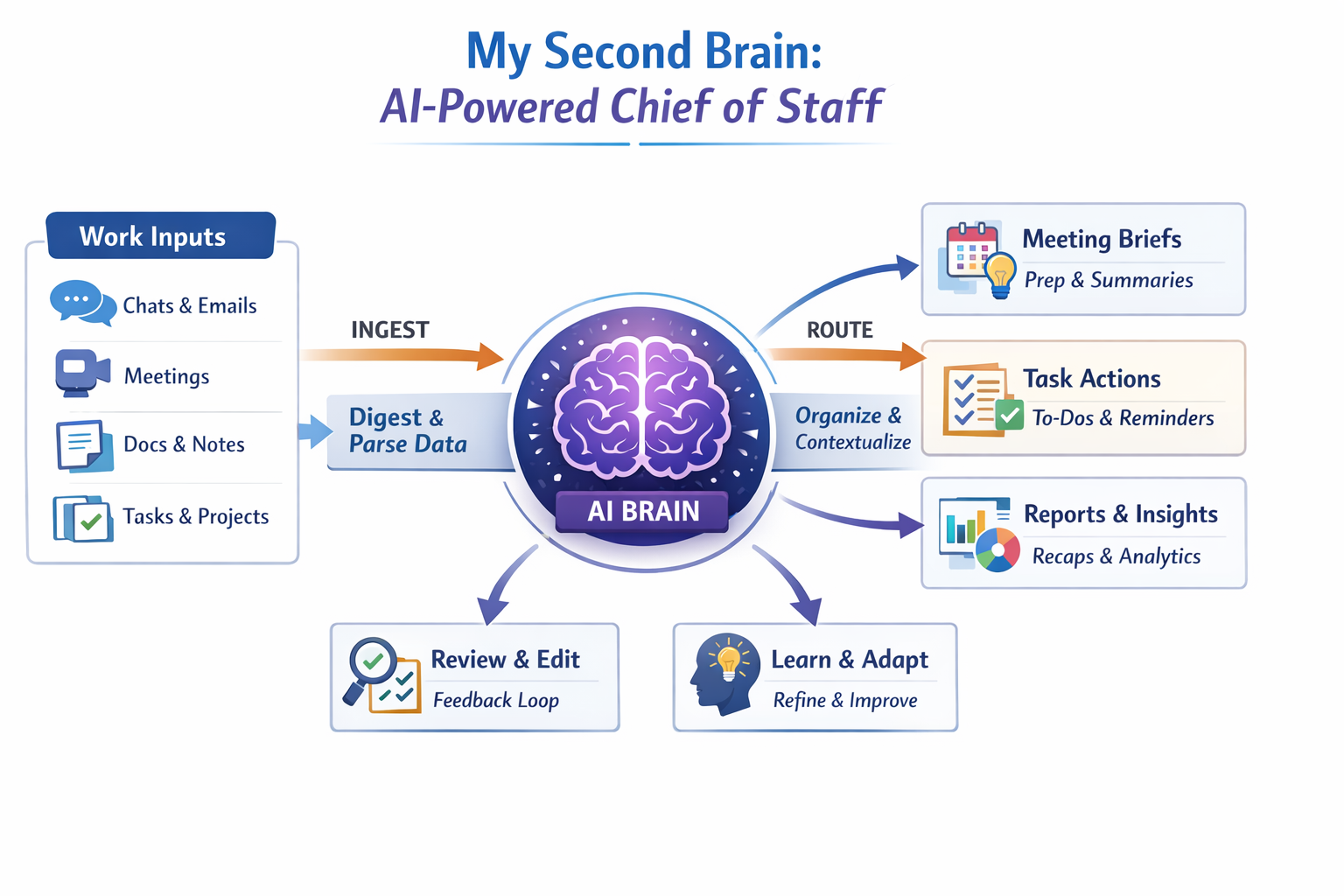
A Typical Day
Most mornings I open my laptop and find that my day is already organized. A few things happen along the way.
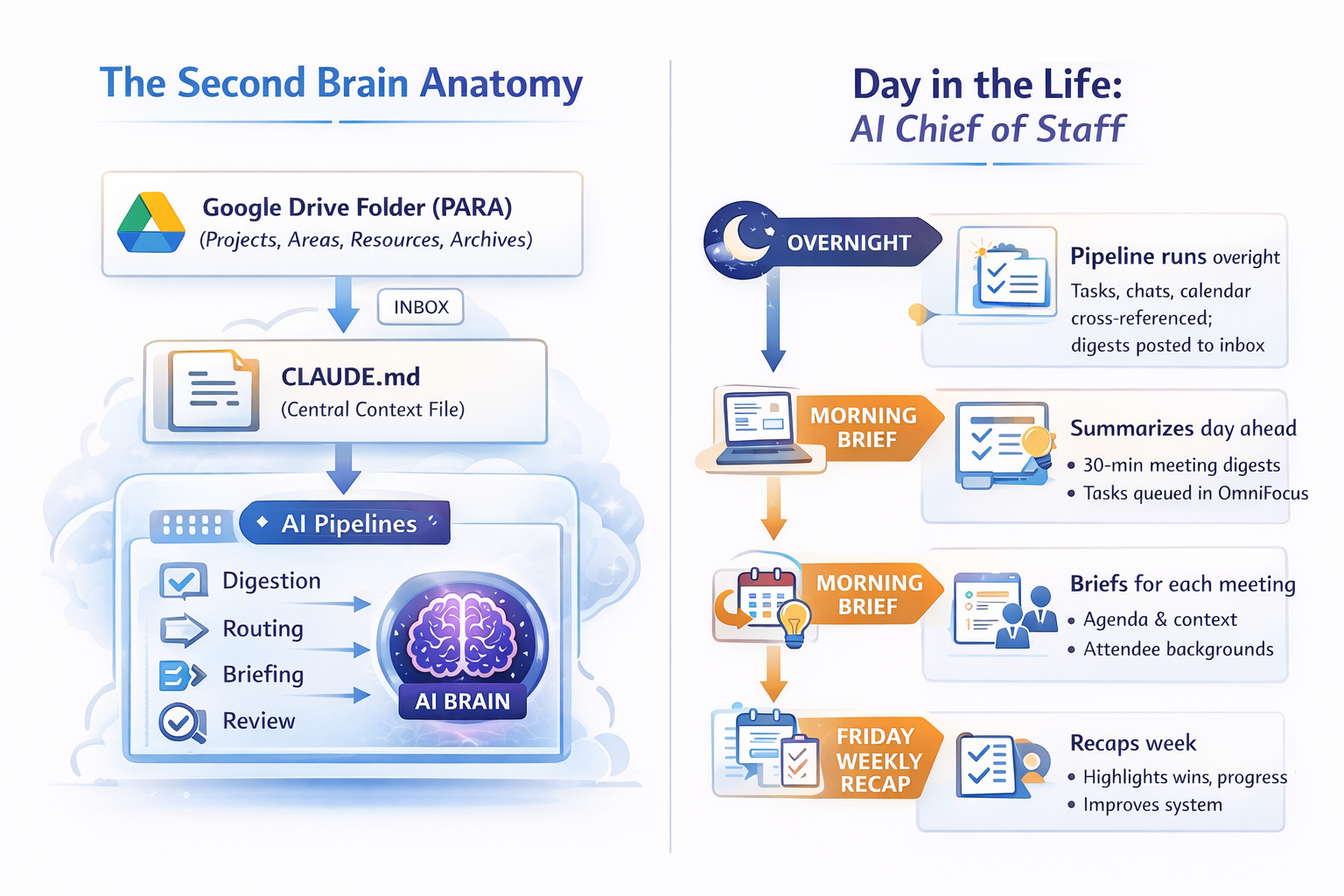
My chat spaces have been summarized and distilled into a digest highlighting key discussions, competitive mentions, decisions made, and items that require my response. Meeting transcripts have been parsed into concise notes with action items and decisions extracted. Upcoming meetings now have short prep briefs that pull together project context, recent chat activity, previous meeting notes, and outstanding tasks.
The system also routes new action items into OmniFocus so they appear directly in my task queue.
At the end of each day, I receive a short productivity report summarizing my activity across meetings, tasks, and communication. It also runs a quick health check across the system itself, surfacing potential risks or blockers, identifying sentiment trends across chat spaces, and tracking how much I modify the agent’s outputs over time.
That last metric is surprisingly useful. It gives a signal for how well the system is learning my preferences.
Weekly Recap
Every Friday, a weekly recap pipeline captures artifacts from the week and ensure that important work doesn’t disappear into chat threads and meeting notes.
The system first determines the current week and checks whether any recaps are missing. If gaps exist, it offers to backfill them automatically.
Next, it gathers artifacts from multiple internal systems. This includes Workplace posts I’ve published, tasks that were closed during the week, shout-outs from colleagues, and signals about whether my manager or skip-level had visibility into the work.
All of these artifacts are presented to me in a simple review step where I can confirm them, add context, or highlight anything particularly important. Once confirmed, the system generates a structured weekly recap.
Over time, these recaps become a surprisingly valuable record of progress.
Under the Hood
The system itself is actually quite simple.
At its core, it consists of a Google Drive folder (you would have Obsidian if you are instrumenting a personal system), a CLAUDE.md, and a cron-driven automation pipeline.
The Drive folder follows the PARA method—Projects, Areas, Resources, and Archives. Pipeline outputs land in a central inbox. Each project folder contains its own CLAUDE.md file listing stakeholders, key documents, and a “Recent Context” section that is automatically populated from chat activity.
The root CLAUDE.md file acts as the brain of the system. It defines my identity, active projects, pipeline procedures, slash commands, formatting preferences, and behavioral instructions for the agent. On every run, the agent reads this file to understand how it should operate.
A background launchd agent runs the pipeline four times per day. If one step fails, the others continue running. Action items trigger a file watcher that creates tasks in OmniFocus via AppleScript and applies tags across several dimensions.
On Fridays, the system also produces a weekly synthesis highlighting recurring themes, unresolved threads, newly surfaced stakeholders, and decisions made.
Retention rules are simple. Competitive mentions are kept for ninety days, decisions are retained for one hundred and eighty days, and risks automatically resolve if there has been no activity for a week.
Core Information Flow
The information flow follows a simple loop.
First, the system ingests information by scanning chat spaces and generating structured digests. Those digests are then routed into the relevant project context files. Each project maintains a small “Recent Context” section where important updates are surfaced as concise bullet points.
From there, action items are generated automatically and routed into OmniFocus, a dedicated Chief of Staff and Secretary chat spaces depending on the content and context, and an internal task system This ensures that important work is surfaced rather than buried.
Some Learnings Along the Way
Building this system taught me three lessons I didn’t expect.
The system improves by learning from my edits. Every document the agent generates is snapshotted. Later, the system compares that snapshot with my edited version and measures what I kept, added, or removed. Over time, this feedback loop significantly improves how the system formats and structures information.
The system builds institutional memory. It maintains decision logs, a competitive tracker, a risk radar, and even a simple people graph that maps stakeholder interactions. A few months in, I can now ask questions like “What did we decide about X?” and receive a dated, sourced answer.
The third and most surprising lesson is that ingestion matters more than generation. When I started building the system, I assumed the value would come from the AI writing documents for me. Instead, the real leverage came from automating inputs: catching up on chat threads, parsing meeting notes, and routing action items. Once the ingestion layer works well, generation becomes far more useful.
How to Get Started
If you want to build something similar, here are some tips.
Dont worry about the tool selection. Codex CLI or Google Workspace CLI can also work if those are your tools of choice. For me, Claude offered everything I wanted.
Start small. Pick one workflow that annoys you the most. For me, it was morning catch-up. I automated that first. Then I added action item routing. Then meeting preparation.
Each layer took a day or two to implement. The six-hundred-line context file started as just twenty lines and gradually grew over about eight weeks.
The key lesson is to keep it simple. Don’t try to build a system. Start by solving one workflow that annoys you, and let the system grow from there.